
Organisation
Asset management
What your organisation has, where it is, who has it and who has booked it.
Included with StewardStack: your administrators install it themselves.
What it does
- Where it is. At one of your places or with someone, at a glance.
- Bookings. For some time or an Event, never double booked.
- QR labels. Whoever finds it can tell you where it is.
About Asset management
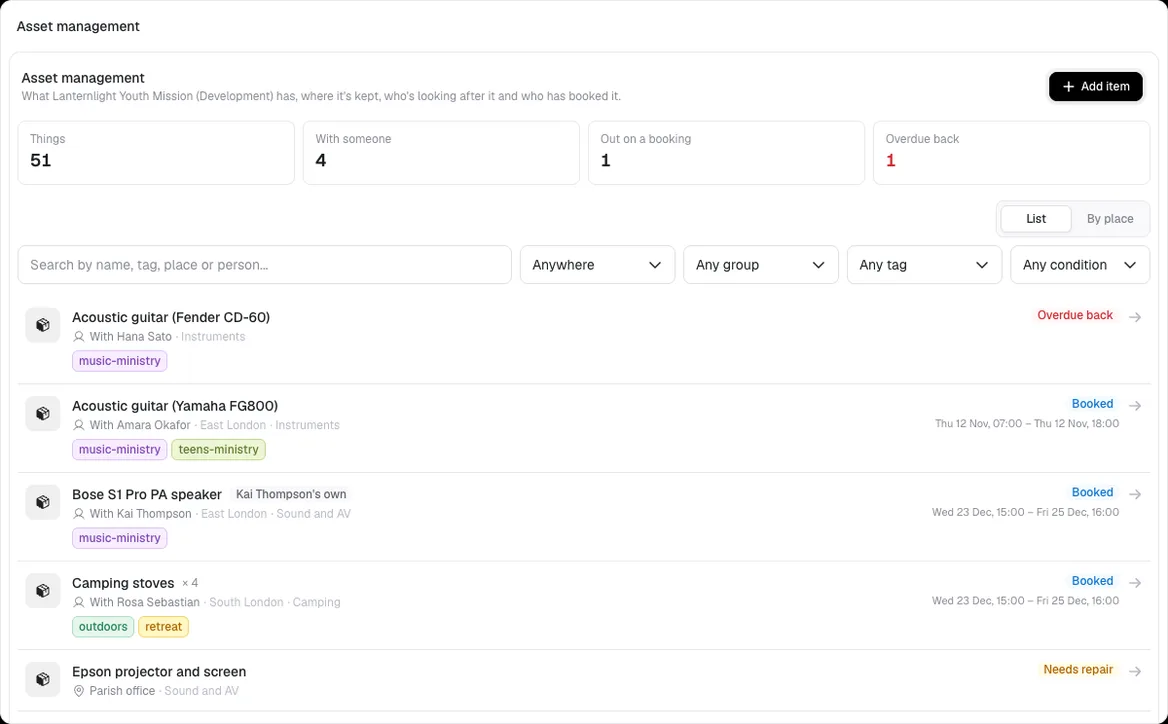
Keep a list of what your organisation has, from the piano and the PA system to 40 folding chairs, each kept at one of your places or with someone, and whether it's yours or lent to you by one of your people.
Book things for a weekend away or for an Event's Equipment tab, with nothing booked twice. Collecting hands it over and returning puts it back, and the Event's checklist reminds the team to do both. A printed QR label lets whoever finds something tell you, without showing who has it.
Where you’ll find it
Once it’s installed, it adds these pages to StewardStack:
- Asset management
- Asset management
More apps & integrations
See them allSee Asset management in StewardStack.
Book a demo and we’ll show you Asset management working with your own Events, people and records.