
Changelog
New features and improvements to StewardStack, week by week: Events, registrations, safeguarding, people, donations and finance.
New features
-
Training records: List the training courses your organisation needs, record when each person completed them, and see who has training to do or due for renewal.
-
Visas and permits: Track employees' and volunteers' visas and permits, and see which are about to expire.
-
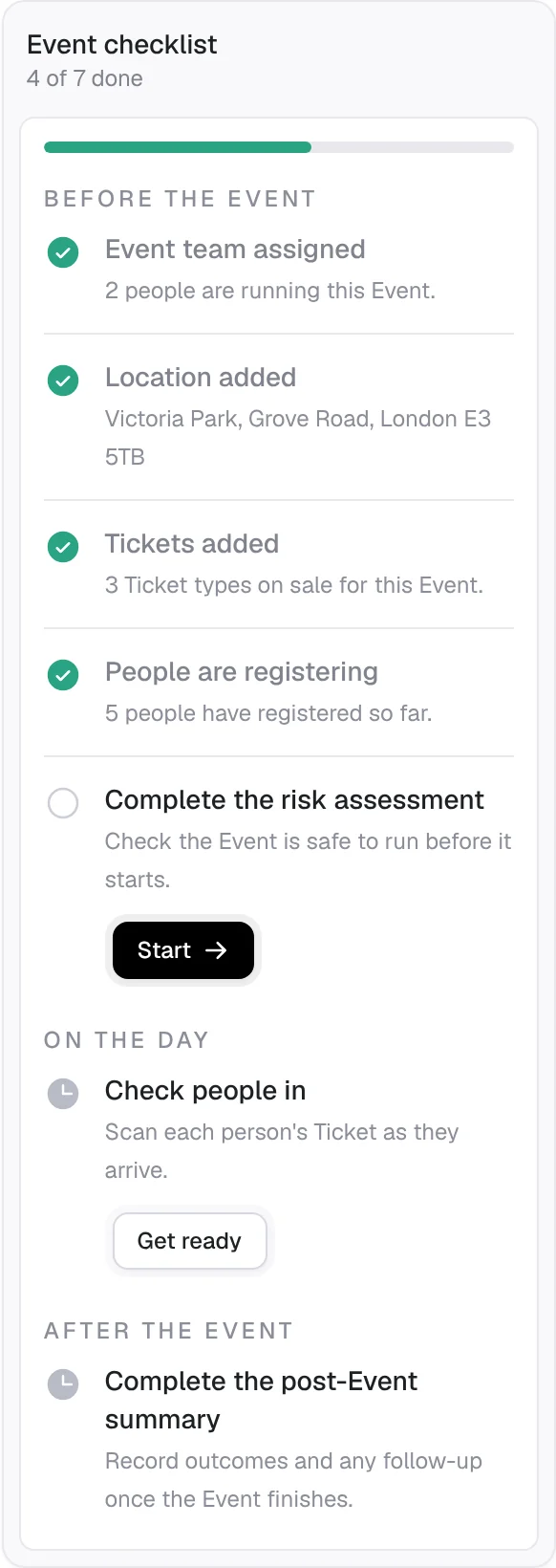
Event checklist: Each Event now has a to-do checklist showing what is done and what is left, before, during and after the Event.
-
Post-Event summary: Complete the summary of each Event in the app once it ends.
-
Sign forms during registration: Guests read and sign required forms, like a code of conduct or parental consent, as they register, already filled in with their details.
-
Connect AI assistants: Let AI assistants read your Events and attendees, and create and change Events and Tickets, only with the permissions you choose.
-
A lead organiser for each Event: Name the person leading each Event alongside its primary contact.
-
Tickets booked alongside another: Make a Ticket available only with another, such as a free child place that needs an adult.
-
Cancel Tickets and record refund reasons: Cancel a guest's Ticket and record why each refund was made.
-
Add a donation at checkout: Guests can add a donation when paying for their registration.
-
Walk-ins at check-in: Check in someone who turns up on the day with just their email or phone number.
-
Donor messages: Require a message from donors and choose the kind of field they write it in.
-
Tidy up unused forms: Delete forms nothing uses, and see where each form is used.
-
Regional videos: Watch and share StewardStack's introduction video in versions for the UK and Ireland.
Improvements
- A simpler dashboard: The dashboard is now a visual overview, with compliance and Event activity on their own tabs.
- Event money at a glance: Payment fees and money totals now show in each Event's money summary and on the Expenses page.
- Clearer free registrations: Free registrations skip the payment summary on screen and in emails.
-
New features
- Pre-Event risk assessment: Complete and sign the risk assessment for each Event inside StewardStack, with every signed copy kept.
- Safeguarding Handbook: Plain-English guidance on safeguarding law for your Country, with tips right where you need them in the app.
- Donation tax relief in Ireland: Irish organisations can track donors' certificates and claim tax back under the Charitable Donation Scheme.
- Mandated persons in Ireland: Flag team members who are mandated persons under Irish law.
- A primary contact for each Event: Choose who on the Event team guests should contact.
- Invite Event team members: See who on an Event's team doesn't have an account yet, and invite them.
- Yearly donations and better amount choices: Take yearly donations, set suggested amounts for one-off, monthly and yearly giving, and offer an "Other" amount.
- Contacts' Event history: See every Event a Contact has attended or is booked on, including guests someone else registered.
- Filter members by role and tag: Find team members by their role or tags, and jump to their team records.
- Each attendee's own email: Tickets can ask for a separate email address for every attendee.
- Invitations with a safeguarding role: Choose a new member's safeguarding role when you invite them.
Improvements
- Expenses: VAT, approvals and reimbursement: Record VAT on expenses, let Finance managers set budgets, and keep approval, payment and paying people back as separate steps.
- A tidier Event page: The Event page's tabs are grouped into menus, and the Event poster sits beside the Overview.
- Drafts kept while you fix a form: Event forms show what needs fixing and keep what you have already typed.
- See the product from the homepage: Watch a short introduction to StewardStack from the top of the homepage.
New features
- Tickets in Apple Wallet and Google Wallet: Guests can add their Ticket to their phone's wallet and show it at the door.
- Donations and payment links: Create donation and payment links, collect Gift Aid declarations, give at Events, and see reports of what came in.
- Monthly donors manage their own giving: Donors who give monthly can update or stop their donation themselves.
- Incident reporting: Record Incidents at Events and outside them, following UK safeguarding practice, with separate Events and Safeguarding roles deciding who sees what.
- Expenses and budgets for Events: Record what each Event spends against its budget.
- The Finance area: A Finance role and a new Finance area show your organisation's money in, money out and what is still owed.
- Scotland and Ireland: Organisations in Scotland and Ireland get the right terms, safeguarding roles and defaults for their Country.
- Install StewardStack as an app: Add StewardStack to your phone's home screen or your computer and open it like any other app.
- Work email for team members: Record a team member's work email, and people who sign in with it are matched to their team record.
- Product, demo and contact pages: New pages on our website explain the product, let you book a demo and get in touch.
Improvements
- Event Organisers see their own Events: Event Organisers see the Events they run, so their list stays focused.
- Polished on mobile: Upcoming Events lead the mobile dashboard, team member profiles have a Details tab, and tabs scroll the active one into view.
New features
- Registration questions: Ask attendees your own questions as they register, for every Event, one Event or one Ticket: short answers, dropdowns or checkboxes.
- Compliance passport: Download a PDF of a team member's checks and records.
- Several payment accounts: Connect more than one payment account and choose which one each Event uses.
- Fees on instalments: Add a fee to each instalment of a payment plan.
- An About page: Meet the people behind StewardStack on our new About page.
Improvements
- Public Event pages carry your branding: Public Event pages now show the organiser's name and branding.
- Refreshed registration emails: Registration emails have a new design and include links to add the Event to your calendar.
- Edit an address after searching: Adjust any part of an Event's address after you find the location.
- Sensible payment defaults: Card payment is turned on when you first set up registration, and paid Tickets default to paying in full by card.
New features
- Payment plans: Let guests spread the cost of a Ticket over several instalments, collected automatically.
- Payment options for each Ticket: Choose whether a Ticket can be paid for by card, in full or in instalments, or offline.
- Guests manage their own registration: Guests can view and manage their registration from a link in their email.
- Reservations awaiting payment: Places held for offline payment show in the registration list until they are paid.
Improvements
- Simpler check-in on the day: Check-in and check-out controls are simpler to use at the door.
New features
- Card payments for Events: Connect your organisation's payment account and take card payments when guests register.
- Team member roles with dates: Record every role a person holds, each with its own start and end date, and see who is active from their roles.
- Contacts: Add Contacts by hand, and registrations link guests to their Contact record automatically.
- Event-day check-in and check-out: New check-in and check-out controls for the day of your Event.
- Invitations you can follow up: See pending invitations in the organisation menu, and resend one with a click.
Improvements
- Better search: Search finds more of what you are looking for, and keeps your search when you open a result.
- Clearer names: Attachments are now called documents, and checks are now called compliance checks.
- More accurate renewal lists: People whose roles have ended no longer appear in DBS renewal lists, and "Requires check" lists only those without one.
- Richer tag pages: Each tag's page shows the records it is used on more clearly.
- A better public registration page: The registration form on a public Event page has a clearer layout.
New features
- Attendance at Events: Check people in and out on the day and see who is there.
- Your organisation's branding: Add your logo and colours to the pages and emails your guests and referees see.
- Import complete compliance records: Bring in full safeguarding and reference histories from a spreadsheet.
- Send reference requests in bulk: Request references for many people in one go.
- Preview the Event Organiser view: Administrators can see the app exactly as an Event Organiser sees it.
Improvements
- Separate response deadlines for references: Set when you need a reference by, separately from when the referee's link stops working.
- Faster check lists: Safeguarding and reference check lists load more rows as you scroll.
- A tidier safeguarding check form: The safeguarding check form is split into tabs, and check details open in a side panel.
- One avatar per person: Each person has the same picture everywhere in the app.
New features
- Event registration: Open registration on an Event and let guests sign up from its public page.
Improvements
- A fuller dashboard: The dashboard shows more of what is happening across your organisation.
- Better tag management: Create, edit and browse tags more easily, with improved navigation around the app.
- Public Events in search results: Public Event pages now carry the details search engines need to show them well.
- More DBS providers built in: More DBS umbrella bodies are available to choose from out of the box.
New features
- Public Event pages: Each Event can have its own page to share with guests, showing when and where it is.
- Organiser pages: Your organisation has a public page listing its upcoming and past Public Events.
- Find Events on a map: Guests can browse and search Public Events, with a map of where they are.
- Your own DBS providers: Add the DBS umbrella bodies your organisation uses, alongside the ones built in.
Improvements
- Smoother forms on phones: Form fields no longer zoom the page when you tap them on a phone.
New features
- Administrator and Event Organiser roles: Give each member the access their job needs: administrators run the whole organisation, Event Organisers run Events.
- New date and time pickers: Every date and time field now uses the same calendar and time picker.
- Check status on each profile: A person's profile card shows the status of their DBS and reference checks at a glance.
- Start a check from the checks list: Add a DBS or reference check from its list page and search for the team member as you go.
- Follow your system theme: Choose light, dark or match your device in Appearance settings.
Improvements
- See exactly what changed: The activity timeline now highlights the exact words that changed in each edit.
- No lost work: StewardStack asks before closing a panel that has unsaved changes.
- Save Events before every detail is known: An Event's location or call link is only needed once you are ready to share it.
Improvements
- Redesigned homepage: A new homepage walks through StewardStack's features, from your team's records to your Events.
- Easier to get started: Clearer buttons to sign in or get in touch, on every screen size.
New features
- A letter from the founders: The homepage now explains, in our own words, why we are building StewardStack and who it is for.
- Frequently asked questions: Answers to the questions organisations ask us most, right on the homepage.
Improvements
- Explore the platform from the homepage: Tap any feature mentioned on the homepage to read more about it without leaving the page.
New features
- Operational calendar: A new Calendar page shows all of your organisation's Events by day and by month.
- Export an Event's attendees: Download an Event's attendee list as a spreadsheet.
Improvements
- Event team changes in the activity log: Adding or removing someone from an Event's team now shows in the Event's comments and activity.
- Clearer forms: Every field has a helpful example, and start and end fields say "Start Date & Time" and "End Date & Time".
New features
- Safeguarding terms for your Country: Checks and roles are named the way your organisation's safeguarding guidance names them.
- Safeguarding checks: DBS checks are now part of a wider safeguarding checks area, with the certificate details kept on their own.
- Separate Employees and Volunteers pages: Employees and volunteers each have their own list, so it is easier to find the right person.
Improvements
- Easier Event team assignment: Choosing who is on an Event's team is quicker and clearer.
Improvements
- A refreshed logo and launch screen: StewardStack has a new logo, and the app opens with a matching launch screen.
- Choose your timezone from a list: Setting your organisation's timezone is now a simple dropdown.
- Redesigned count badges: The numbered badges in the sidebar have a cleaner, more consistent design.
New features
- Events: Create Events, set their dates and times, and keep the details your team needs in one place.
- Event times in your timezone: Event dates and times are shown in your organisation's timezone, wherever your team is.
- Profile pictures: People's profile pictures now appear across the app.
Improvements
- Built for phones: The app's layout has been flattened for small screens, and the header now stays in view as you scroll.
New features
- Import team members and DBS records from CSV: Upload a spreadsheet to add your whole team and their DBS checks at once, instead of typing each one in.
Improvements
- A clear title on every page: Each page now has its own title, so browser tabs and history show exactly where you are.
- Clearer count badges: The counts beside each section are easier to read at a glance.
Improvements
- Loading screens shaped like each page: While a page loads you see an outline of what is coming instead of a blank screen.
- Progress while your organisation opens: Opening your organisation now shows a progress bar that keeps moving until everything is ready.
New features
- Dark mode across the platform: Every page and control now has a dark theme that is easy on the eyes in the evening.
Improvements
- Tidier comments and activity: Comments and the activity timeline now share the same look as the rest of the app.
New features
- Team records in one place: Keep everyone who serves in your organisation on one list, with a profile page for each person.
- DBS checks: Record each person's DBS check, see when it was issued and spot who still needs one.
- Online reference checks: Send referees a link to an online reference form and see their answers on the person's record as soon as they reply.
- Live updates for the whole team: Changes appear straight away for everyone in your organisation, on every device, without refreshing the page.