
New features
-
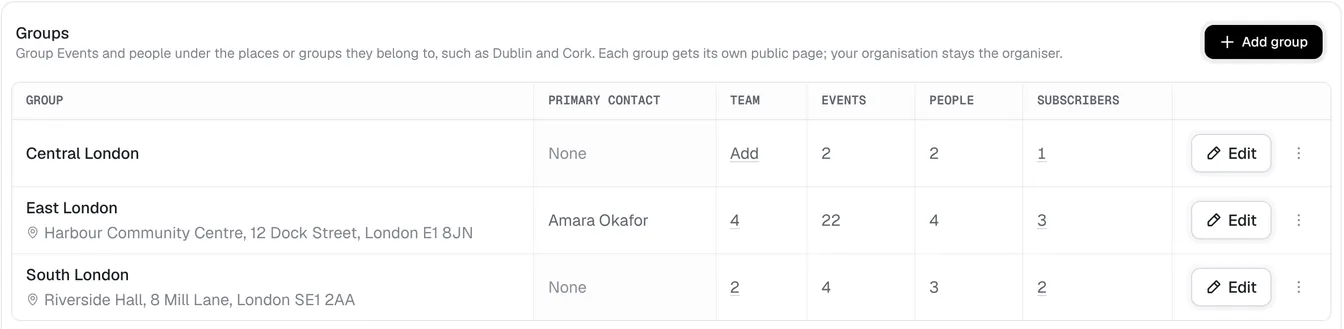
Communities: Group Events and people into communities, such as Dublin or Cork, each with its own public page, its own team and your own word for them.
-
Pathways: Put people on a mentoring or welcome pathway with a mentor, steps to tick off and regular check-ins.
-
App store: Switch features like Safeguarding, Pathways and Communities on and off as apps, and connect AI assistants and your own systems from the same place.
-
Forms: Make forms for anything, such as volunteer applications, open them by hand, on dates or up to a limit, and see responses summarised or exported.
-
Access review: See everyone's access in one place in Settings › Access, spot what needs attention and change several people at once.
-
Event team access: Tick what each person can do on an Event, such as bookings, check-in or the budget, starting from ready-made roles.
-
Organisers for one Event: Make someone the organiser of just the Events you choose, and email people each time they are added to an Event team.
-
Engagement report: See attendance over time, how often people come and each Event's numbers on Dashboard › Engagement.
-
Event guests: Add guests to an Event's attendance without a Ticket, linked to their profile, with notes.
-
People filters and saved views: Filter People by tags and by the Events they came to, and save views for the whole team.
-
Find and merge duplicates: Find people entered twice, see what a merge keeps and combines, and merge them from one page.
-
Email people: Email one person from their profile, or several from the People list, with each email kept on their Emails tab.
-
Contact details and key dates: Keep a Contact's phone, address and date of birth, and see their key dates, like joining or a baptism, on a timeline.
-
Platform access on People: Invite people, change their roles and remove their access from their profile or the People list.
-
Email previews and sent log: Preview every email StewardStack sends for you in Settings › Emails, see a log of every email sent, and send a booking's email again.
-
Event team reminders: Each Event's team is emailed what is still theirs to do before and after it, from the risk assessment to the summary.
-
Tracked links: Share an Event page with a tag for each place you post it, and see the views and bookings each one brought in.
-
Fortnightly and chosen-date repeats: Repeat an Event every fortnight, or on the dates you pick one by one.
-
Import donations: Import gifts from other platforms' exports, with each one counted once, and add them to a donation link's total.
-
Donate an expense: Someone who paid for an expense can donate it instead of being paid back.
-
Event donors for organisers: Event Organisers see their own Event's donations and donors.
-
Eircode lookup: Find an Event's location by its Eircode, and exact addresses anywhere.
-
Tickets for each participant: Everyone booked by someone else gets their own ticket by email.
Improvements
- Emails that read like letters: Emails from StewardStack read as personal letters.
- Easier attendance: Check-out is optional, people show as Attended after an Event, and guests are added from the top of the page.
- Easier to find: Events have an Edit button, and People has an Add person button.
- A faster start: The app and the dashboard open faster.
- Stay signed in: Stay signed in for up to 30 days, and confirm it's you before important changes.
- Get tickets bar: The public Event page's Get tickets bar sits within the page, with the Ticket name and price.
- Directions and sharing: The public Event page shows Directions, Add to calendar and Share under the map.
- Missing receipts: Event Organisers and Finance managers can attach a receipt an expense is missing.
- Event photos and videos: Duplicate uploads are skipped, and each one shows who uploaded it.
- Speakers linked to People: Each speaker links to who they are in People, and the Speakers panel finds anyone in People.
- Goals beside the summary: Mark an Event's goals met, partly met or not met beside its summary.
- Clearer payments: A checkout donation shows as its own line in Payment history, and a refunded Ticket shows why it was refunded.
- Discount codes up to 100%: Discount codes can take everything off, and bookings a code makes free skip the card checkout.
- Colourful landing pages: Our website's product pages have colourful feature cards and moving product previews.